SoundCraft: The Free Rust DAW Disrupting Music Production
SoundCraft is a free, open-source DAW built in Rust with Pro Tools-level features, native CLAP/VST3 support, and 9.1.6 surround sound—no subscription

The digital audio landscape is shifting. ArtCraft has officially unveiled SoundCraft, a free, open-source Digital Audio Workstation (DAW) built from the ground up in pure Rust. Designed as a high-performance alternative to traditional commercial recording suites like Pro Tools, SoundCraft offers sub-millisecond responsiveness, native cross-platform support, and an open codebase for sound engineers, beatmakers, and software developers alike.
Built from Scratch in Pure Rust
By rewriting the digital audio engine in Rust, ArtCraft addresses long-standing performance bottlenecks found in legacy C++ audio software. Rust's compile-time memory safety and zero-cost abstractions deliver thread-safe, low-latency audio processing without the risk of unexpected crashes during live mixing or heavy multi-track recording sessions.
SoundCraft runs natively across virtually every desktop operating system—including macOS (Apple Silicon & Intel), Windows (64-bit & ARM64), and Linux (Flatpak, AppImage, deb, rpm)—as well as in-browser via WebAssembly and headlessly through a command-line interface (CLI).
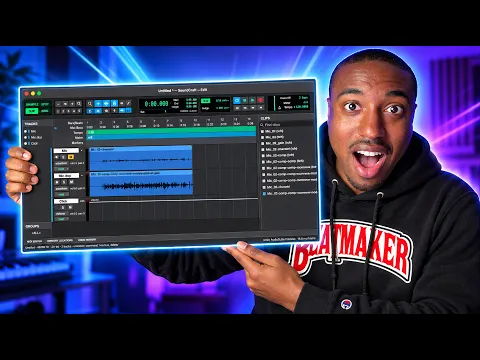
Pro-Grade Studio Workflow & Mixing Architecture
SoundCraft mirrors the familiar, tactile layout of high-end commercial recording environments while stripping away restrictive licensing fees and proprietary hardware constraints.
Core Studio Capabilities
- Dual Studio Layout: Dedicated Edit and Mix windows paired with single-key Command-focused shortcuts for high-speed tracking and editing.
- Pro Editing Modes: Full support for Shuffle, Slip, Spot, and Grid editing modes, alongside comping playlists and quick memory location recall.
- Console Mixing Power: Each track channel strip features 10 insert slots and 10 aux sends, supplemented by VCAs, routing folders, solo-in-place, and automatic plugin delay compensation (PDC).
- Live Dynamic Automation: Real-time Write, Touch, Latch, and Trim automation modes for volume faders, pan knobs, mute states, aux sends, and individual plugin parameters.
- Spatial Audio & Video Sync: Panning up to 9.1.6 surround sound with live speaker rendering, plus a dedicated synchronized picture track for film scoring and post-production.
- MIDI & Score Tools: Full piano-roll editor, velocity lane manipulation, step-input quantization, musical score notation editing, and integrated audio-to-MIDI pitch detection.
Eliminating Gatekeeping: Universal Plugins & AI Extensibility
One of SoundCraft's most notable features is its refusal to lock users into proprietary plugins. While legacy workstations often enforce proprietary plugin formats (such as AAX), SoundCraft offers native support for open CLAP plugins alongside standard VST3 and Audio Units (AU).
Popular audio production creator Busy Works Beats highlighted SoundCraft in a recent deep-dive video, noting that SoundCraft acts as a fully customizable Pro Tools alternative.
Because the complete source code is hosted publicly on GitHub, creators and engineers can use AI coding agents or local scripts to modify interface elements, fix plugin-scanning routines, and tailor custom workflow features without waiting for annual corporate software updates.
SoundCraft vs. Traditional Commercial DAWs
| Feature | ArtCraft SoundCraft | Legacy Industry DAWs (e.g., Pro Tools) |
| Price & License | 100% Free & Open Source | Perpetual License or $30–$100+/mo Subscription |
| Core Engine Language | Pure Rust | Legacy C / C++ |
| Plugin Formats | CLAP, VST3, AU (Native) | Proprietary (AAX / Hardware-locked) |
| Spatial Audio | Up to 9.1.6 Surround built-in | Tiered / Paid HD Add-on required |
| Platform Support | macOS, Windows, Linux, WebAssembly, CLI | macOS, Windows |
| Customization | Full source code access & AI-assisted tuning | Closed source |
Our Thoughts
The whole DAW runs smoothly on my Apple Silicon machines; there is a bit of a learning curve, but if you are used to DAW environments, it's not hard to work out.
A great freebie and one that could grow into a powerful music production tool for musicians worldwide. We recommend downloading it and giving it a try.
I love open-source software because it gives creatives tools they can use right away, without paywalls or subscriptions.
How to Get Started
SoundCraft (currently in Version 0.5.0) can be installed standalone or via the unified ArtCraft Launcher, which manages updates across ArtCraft’s entire open-source creative suite (including PhotoCraft, FilmCraft, and VectorCraft).
- Official App Page: getartcraft.com/apps/soundcraft
- GitHub Repository: Build directly from source using
cargo run --release -p soundcraftwith Rust 1.90+.
- +Free and open-source with no subscription fees
- +Sub-millisecond latency and thread-safe audio engine
- +Native support for CLAP, VST3, AU—no proprietary lock-in
- +Full source code access for customization and AI-assisted tuning
- +Pro-level mixing: 10 insert slots, VCAs, automation, PDC
- +Surround sound up to 9.1.6 with live speaker rendering
- +Cross-platform: macOS, Windows, Linux, WebAssembly, CLI
- +MIDI tools, score notation, and audio-to-MIDI pitch detection
- −Still in Version 0.5.0—early-stage software with potential stability issues
- −Smaller user base and ecosystem compared to Pro Tools or Logic
- −Limited third-party plugin market compared to established DAWs
What is SoundCraft and who makes it?
SoundCraft is a free, open-source DAW developed by ArtCraft, written entirely in Rust. It delivers sub-millisecond responsiveness, thread-safe low-latency audio processing, and runs natively on macOS, Windows, Linux, WebAssembly, and via CLI.
How does SoundCraft compare to Pro Tools?
SoundCraft matches Pro Tools on mixing features—10 insert slots, 10 aux sends, VCAs, automation modes, and surround up to 9.1.6. Key differences: SoundCraft is free and open-source, uses CLAP/VST3/AU instead of proprietary AAX, and lets users modify the full source code without waiting for updates.
What plugin formats does SoundCraft support?
SoundCraft natively supports CLAP, VST3, and Audio Units (AU). It deliberately avoids proprietary formats like AAX to eliminate vendor lock-in and allow users to customize or extend the DAW via its public GitHub codebase.
Is SoundCraft ready to use?
SoundCraft is in Version 0.5.0 and can be installed standalone or via the ArtCraft Launcher. The core mixing, editing, and MIDI tools are functional, though it remains actively developed. Users can also build from source on GitHub using Rust 1.90+.
Keep browsing

Get this stuff first.
Leaks, deals and reviews in your inbox, once a week. No spam, just gear.