

For modern guitarists, amp sims and effects plugins have completely revolutionized playing at home. But let’s be honest: sometimes you just want to plug in, fire up your favorite virtual rig, and play. Opening a massive Digital Audio Workstation (DAW) like Logic Pro or Ableton, setting up tracks, and dealing with routing can instantly kill your inspiration.
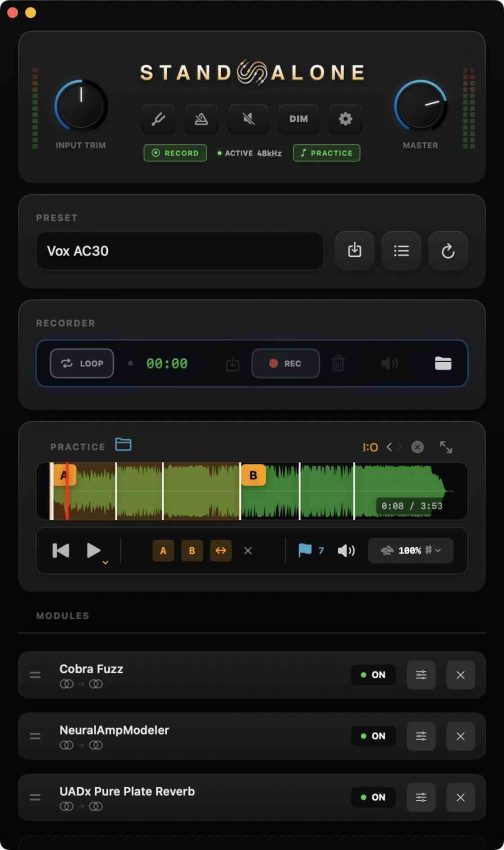
Enter Standalone, a brand-new, lightweight AU and AUv3 plugin host for Mac designed to solve this exact problem. Built strictly for practicing and capturing ideas, Standalone strips away the bloated timelines and mixing consoles, giving guitarists a focused, purpose-built environment to just play.
Key Features for the Modern Player
Standalone isn’t trying to replace your DAW for full-scale production. Instead, it focuses heavily on the tools guitarists need for practice and quick recording:
-
Universal Hosting: Run your favorite stereo Audio Unit (AU) and AUv3 plugins seamlessly.
-
Built-in Recorder: Capture your ideas instantly as high-quality 32-bit float WAV files.
-
Integrated Looper: Loop sections on the fly for soloing practice or layering ideas.
-
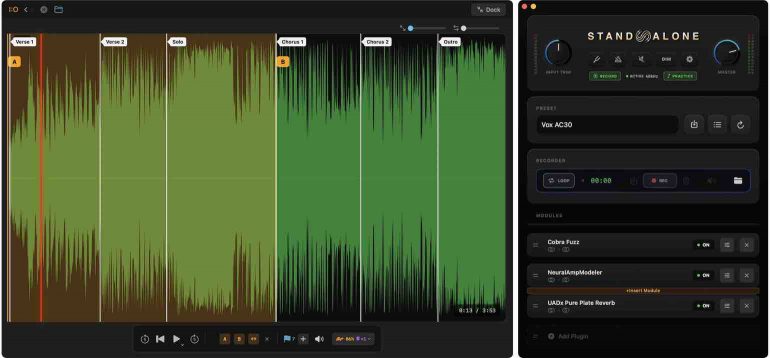
Smart Practice Mode: Features real-time time-stretching, allowing you to slow down difficult songs or backing tracks without altering the pitch.
-
Scores and Charts Viewer: Keep your tabs, sheet music, or chord charts open right alongside your plugin interface.
-
Essential Utilities: Includes a built-in chromatic tuner and metronome.
-
Global Keyboard Shortcuts: Keep your hands on the guitar with hotkeys for basic transport and recording controls.
-
Low CPU Footprint: Optimized to run smoothly without taxing your Mac’s resources.
Our Verdict
If you are a Mac-based guitarist tired of loading up a heavy DAW just to practice your scales or jam along to a backing track, Standalone is an absolute no-brainer.
This could also be great if you are on a restricted budget, and you pair it with some free guitar amp software. I compiled and reviewed a list of some great-sounding free guitar amp software here. You may also want to check out my handy article on how to record great guitar tones on a budget.
While the lack of MIDI controller support and the strict macOS Sonoma requirement might leave a few users waiting, the incredibly low price point and highly focused feature set make it a winning utility.
Available at getstandalone.com for just $14.99.
| Pros | Cons |
| Highly Affordable: Only $14.99 with no subscription | Mac Only: Requires macOS 14.0 (Sonoma) or newer |
| No Annoying DRM: No iLok, dongles, or always-on internet | No MIDI Controller Support: Not available at this time |
| Practice-Focused: Built-in charts, looper, and time-stretching | Bring Your Own Gear: Does not include any built-in plugins |
| Generous Trial: 7-day free trial with no credit card required | Not for Gigs: Designed strictly for practice, not live shows |
Frequently Asked Questions (FAQ)
What plugins actually work with Standalone?
Most Audio Unit (AU) plugins will work perfectly, provided they support stereo (not mono-only). A good rule of thumb: if it works smoothly in Logic Pro, it should work in Standalone. Standalone automatically scans your plugin folders on launch, and you can manually rescan via Settings if you add something new.
Is this just another DAW?
No. There is no timeline, no MIDI sequencing, and no mixing console. It is entirely for playing, practicing, and quickly recording ideas, not for producing full tracks.
Do I need an audio interface?
Yes. You will need a standard audio interface to get your guitar signal into your Mac. You can even use different interfaces for your input and output if needed.
What kind of copy protection does it use?
The 7-day trial is completely key-free. Once purchased, you receive a standard license key that works on up to 2 Macs. There is no iLok, no USB dongle, and no continuous internet connection required after the initial activation.
Where do my recordings go?
Your recordings are automatically saved as 32-bit float WAV files to ~/Music/Standalone/Recordings/ and are neatly organized by your preset names.
How do I back up my presets?
It’s simple: go to Settings, scroll to the bottom, and click the button to open the data folder. Just copy that folder to a safe location or cloud drive.
Are future updates free?
Yes! Bug fixes and standard improvements will always be free. The developers have noted that major new feature additions down the road might be offered as paid upgrades.
More Information
#Standalone #Mac #Plugin Host
This article may contain affiliate links to Andertons, DeathCloud, Donner, Fender, Gear4Music, Positive Grid, Stew Mac, Sweetwater, and Thomann that help finance the running costs of GuitarBomb. We will receive a small commission if you buy something through these links. Don’t worry; you pay the same price, and it costs you no extra to use these affiliate links for your purchases.


