

As guitarists, we spend countless hours perfecting our tone – from string choice to pedalboards to amp settings. But what happens when you need to send that beautiful tone to a mixing console for live sound or recording? Plugging directly in often results in a weak, noisy, or just plain “wrong” sound. This is where the humble passive DI (Direct Injection) box becomes an indispensable part of your toolkit.
Forget fancy electronics; the passive DI is an elegant, power-free solution that ensures your guitar’s voice is heard clearly, consistently, and without interference.
What is a Passive DI Box and Why Do You Need One?
Imagine your electric guitar signal as a delicate whisper. It’s strong enough for your amp right next to you, but try to send that whisper across a long room to a listener, and it gets lost in the background noise.
Your guitar’s output is typically a high-impedance, unbalanced signal. Mixer inputs, on the other hand, are designed for low-impedance, balanced signals (like microphones). Plugging a high-impedance guitar directly into a low-impedance mic input is like trying to fit a square peg in a round hole – it works, but not well. You lose volume and clarity, and you’re highly susceptible to hum and buzz, especially over longer cable runs.
A passive DI box uses a special audio transformer to perform two crucial tasks:
-
Impedance Matching: It converts your guitar’s high-impedance signal into a low-impedance signal that mixers and recording interfaces love. This preserves your tone and ensures proper gain staging.
-
Signal Balancing: It transforms your unbalanced signal into a balanced signal. Balanced cables (like XLR) use three wires to effectively cancel out noise and interference, allowing your sound to travel long distances (hundreds of feet!) without degradation.
The “passive” part means it doesn’t require any external power (no batteries, no phantom power). It works purely through the magic of electromagnetism.
When to Use a Passive DI Box
Here are the prime scenarios where a passive DI box will be your best friend:
-
Live Gigs (Sending to Front-of-House):
-
Acoustic Guitars with Pickups: Many acoustic guitar pickups (especially passive ones) benefit immensely from a DI to get a strong, clean signal to the main PA system.
-
Electric Guitars (for Amp Sims/Modelers): If you’re using an amp simulator pedal (like an Iridium, Helix, Kemper, or similar) or an amp with a line out, a DI box ensures a clean signal reaches the sound engineer.
-
Keyboards & Synthesizers: Many keyboards have high-impedance outputs that can cause issues when plugged directly into a mixer. A DI is perfect for these.
-
Bass Guitars: Both passive and active basses can benefit. While active basses might have a lower output impedance, a DI still provides balancing and ground lift capabilities.
-
Whenever you need to run a long cable to the mixer, the balanced output helps prevent noise.
-
-
Studio Recording:
-
Recording Direct (“DI Track”): Often, engineers will record a “clean DI” track of your guitar alongside your mic’d amp. This allows for re-amping later (sending the clean track through different amps and mics) or using amp simulation plugins. A passive DI ensures this clean track is pristine.
-
Keyboards & Other Instruments: For pristine recordings of any instrument with a high-impedance output.
-
How to Use Your Passive DI Box (It’s Easy!)
-
Instrument to DI Input: Plug your guitar (or other instrument) into the 1/4″ INPUT jack on the DI box.
-
DI Thru to Amp (Optional): If you want to hear your amp on stage, connect the 1/4″ THRU (or “LINK,” “PARALLEL OUT”) jack on the DI to your guitar amplifier’s input. This allows you to monitor your sound as usual.
-
DI Output to Mixer: Connect an XLR cable from the DI box’s XLR OUTPUT to a microphone input on the mixing console or audio interface.
Understanding the Switches:
-
Ground Lift: This is your secret weapon against hum! If you hear a low-frequency buzz, flip this switch. It breaks the electrical connection between the input and output grounds, often eliminating “ground loops,” which are a common source of noise. If the hum gets worse, flip it back.
-
Pad: Some DI boxes have a “Pad” switch (e.g., -15dB, -20dB). If you’re plugging in a very high-output instrument (like an active bass, a keyboard, or an amp’s line out), the signal might be too hot and distort the DI’s transformer or the mixer’s input. Engage the pad to reduce the signal level, preventing clipping and distortion.
Recommended Passive DI Boxes
While many great passive DIs exist, here are a few well-regarded models that offer excellent performance and value:
Radial Engineering JDI
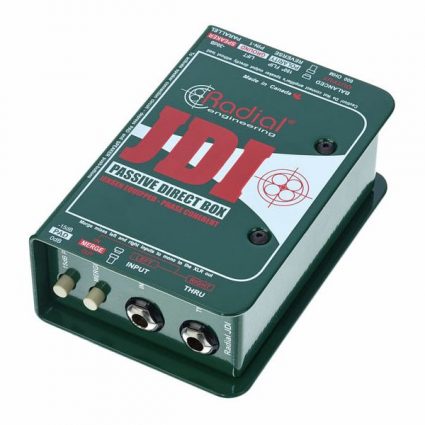
- Available at Andertons, priced at £259
- Available at Sweetwater, priced at $259.99
- Available at Thomann, priced at €279
Whirlwind IMP 2
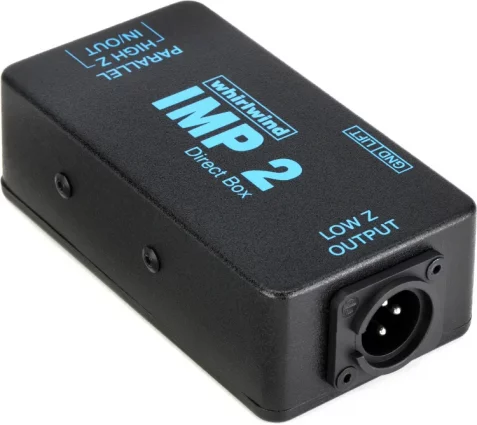
A classic, rugged, and affordable passive DI. It’s a workhorse that sounds great for most applications and is virtually indestructible. A fantastic entry-level professional option.
Available at Sweetwater, priced at $79
Palmer PAN 01 Passive DI Box
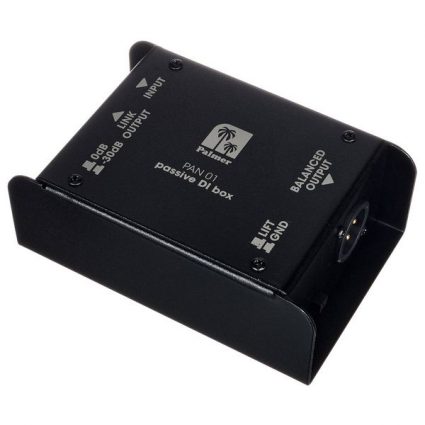
Known for its clean signal and robust build quality, the Palmer PAN 01 is another excellent choice for guitarists and bassists. It often features a solid steel housing.
Available at Thomann, priced at €44
Passive vs. Active DI: Which One Do You Need?
While this article focuses on passive DIs, it’s worth a quick comparison:
-
Passive DI (this article):
-
Pros: No power needed, excellent for high-output instruments (keyboards, active basses, amp modelers), can add a subtle “warmth” or transformer saturation at higher levels, virtually indestructible.
-
Cons: Can slightly “load down” very weak signals from passive pickups, resulting in a slight loss of high end (though high-quality transformers minimize this).
-
Best for: Active guitars/basses, keyboards, amp line outputs, any high-output device.
-
-
Active DI:
-
Pros: Requires power (battery or phantom power), provides a buffered signal (doesn’t load down pickups), can provide gain for very weak signals, often has a very flat and transparent frequency response.
-
Cons: Requires power, can be clipped by very hot signals if not properly padded.
-
Best for: Passive guitars/basses, piezo pickups (acoustic guitars), any low-output device.
-
For most electric guitarists using pedals or active instruments, a passive DI is often the perfect, hassle-free choice.
Passive DI Box FAQ for Guitarists
Q: Do I need a DI box if I’m just mic’ing my amp? A: Not strictly for sending your amp’s sound to the mixer. However, many engineers will still ask for a DI from your pedalboard/amp modeler before your amp, so they have a clean signal for re-amping or backup.
Q: Will a passive DI change my tone? A: A high-quality passive DI with a good transformer (like a Jensen or similar) should be very transparent. Cheaper ones might subtly roll off some high-end or introduce slight coloration, but often this is negligible or even desirable (a subtle “warmth”).
Q: Can I use a passive DI with my passive electric guitar? A: Yes, you can. However, an active DI might be a slightly better choice for a very low-output passive guitar, as it won’t “load down” the signal as much. That said, many guitarists successfully use passive DIs with passive guitars, especially if they have a buffer pedal in their signal chain before the DI.
Q: What’s a ground loop, and how does a DI fix it? A: A ground loop happens when there are multiple paths to ground, creating unwanted current flow and audible hum. Because the DI’s transformer isolates the input ground from the output ground, it can break the loop when you engage the ground lift switch, eliminating the hum.
Q: Is it okay to use really long XLR cables after the DI box? A: Absolutely! That’s one of the main benefits. Balanced XLR cables are designed to run hundreds of feet without significant signal degradation or noise pickup.

Ready for the Stage
A passive DI box might not be the flashiest piece of gear on your pedalboard, but it’s undoubtedly one of the most crucial for ensuring your guitar tone translates perfectly from your instrument to the audience or recording.
It’s a simple, robust, and effective tool that every gigging or recording guitarist should own. Invest in a good one, learn its basic functions, and enjoy the peace of mind that comes with a clean, balanced signal every time.
More Useful Guitar Bomb How-to Guides
#passive DI box
This article may contain affiliate links to Andertons, DeathCloud, Donner, Fender, Gear4Music, Positive Grid, Sweetwater, and Thomann that help finance the running costs of GuitarBomb. We will receive a small commission if you buy something through these links. Don’t worry; you pay the same price, and it costs you no extra to use these affiliate links for your purchases.


