MorningDAW: Free AI-Powered DAW. Yes, More Free Music Production
MorningDAW is a completely free, AI-powered DAW for macOS, Windows, and Linux. Discover its lightweight design, built-in instruments, and smart production

Independent developer Morningdew Media, founded by veteran composer and audio creator Mattias Holmgren and his brother Nicholas, has officially unveiled MorningDAW—a groundbreaking, completely free digital audio workstation (DAW) for macOS, Windows, and Linux.
Designed for musicians, MorningDAW bridges the gap between lightweight simplicity and professional-grade music production. With AI-driven assistant capabilities, context-aware pie menus, multi-view editing engines, and built-in virtual instruments, the software streamlines music creation without subscription fees, trial limits, or license keys.

What Sets MorningDAW Apart?
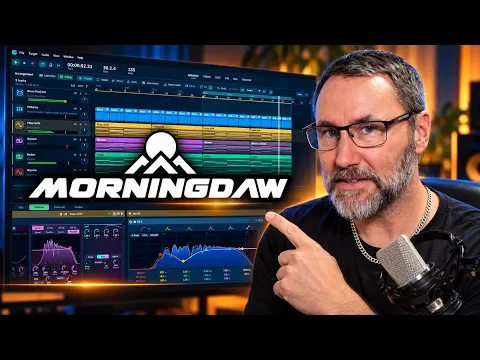
MorningDAW disrupts the traditional music software market by combining top-tier production workflows into an ultra-lightweight, 100 MB GPU-rendered application. Rather than forcing producers to adapt to rigid linear timelines, MorningDAW offers unprecedented flexibility across multiple view modes that seamlessly edit the same underlying composition.
Key Highlights at a Glance
- 100% Free & Royalty-Free: Full access to all production features with no trial clock, time limits, or commercial restrictions.
- Built-In AI Assistant: Integrates natural language processing to edit tracks, arrange clips, and adjust routing using plain text commands.
- Radial Pie Menus: Contextual menu wheels inspired by visual art applications like Krita allow users to trigger actions instantly beneath their cursor.
- Versatile Multi-View Workflow: Effortlessly switch between an Arrangement Timeline, Clip Stage, Step Sequencer, Classical Tracker, and Full Score Notation page.
- Integrated 4K Video Visualizers: Export ready-to-publish music videos directly from the DAW in up to 4 K.
AI-Powered Assistance & Smart Songwriting Tools
One of MorningDAW’s most discussed innovations is its integrated AI Assistant, which translates plain-language prompts into complex DAW actions. Music creators can ask the assistant to construct FX send channels, apply vocal chains, configure sidechain routing, or structure musical sections on the fly.
Beyond natural language control, MorningDAW includes intelligent composition utilities designed to eliminate writer's block:
- Smart Chord & Melody Generators: Automatically suggest genre-specific chord progressions (Cinematic, Lo-Fi, Indie Pop) and plot recommended note placements across the piano roll.
- Auto-Align Quantization: A human-aware quantize engine that subtly aligns MIDI notes while preserving natural groove and feel.
- Scale Lock & Chord Lanes: Keeps melodic writing in key with interactive auditioning directly inside the timeline.
Studio-Grade Features for Recording & Mixing
MorningDAW delivers an extensive collection of stock instruments and mixing tools right out of the box, eliminating the immediate need for expensive third-party plugins:
| Category | Features & Bundled Tools |
| Virtual Instruments | Wyvern (Wave-table synth), Ember (Virtual analog), Retro Chiptunes (PSG49, SID station), 128-pad Drum Machine, and Multi-sampler. |
| Vocal & Mixing Chain | Specialized devices include Vocal Rider, De-esser, Vocal Doubler, Tape Machine emulation, and Noise Reduction. |
| Audio/MIDI Engine | Full CLAP, VST3, and Audio Units (AU) support, MPE support, audio/MIDI comping, Live Looping, and Retrospective Record. |
| Non-Destructive Project History | Automatic background checkpointing that allows producers to audition, restore, or recover deleted tracks from any save point in time. |
Rapid Workflow: Pie Menus & Instant Access
Speed is MorningDAW's central philosophy. When you open it, project files load immediately in the background. Right-clicking anywhere in the arrangement view opens dynamic pie menus that group instruments, editing tools, and track-setup functions into intuitive radial selection wheels.
For electronic producers and tracker enthusiasts, MorningDAW also embeds a full-blown pattern tracker alongside modern Clip Stage launching, offering a rare fusion of classic tracker programming with contemporary DAW features.
This latest AI DAW looks even more stable than SoundCraft, and it costs nothing to use.
Availability & System Requirements
MorningDAW is available now for free download directly from Morningdew Media.
- Platforms: macOS, Windows, and Linux.
- Download Size: ~100 MB installer.
- Hardware Requirements: Low CPU footprint with GPU-accelerated interface rendering; compatible with standard ASIO drivers and external audio interfaces supporting up to 128 audio inputs.
Technical Specifications Summary
Core Audio Engine & Hardware I/O
- Supported Audio Drivers:
- macOS: Core Audio
- Windows: WASAPI, DirectSound, ASIO
- Linux: PulseAudio, PipeWire, ALSA, JACK
- Channel Capacity: Up to 128 audio inputs and 128 audio outputs per interface, complete with driver channel naming.
Signal Routing & Mixing
- Routing System: Comprehensive Routing Matrix for both audio and MIDI signals.
- Sidechaining: Built-in sidechain support for native effects (Compressor, Gate, Rider) and third-party plugins.
- Bus & Send Infrastructure: Group tracks, dedicated buses, pre/post-fader sends, per-track hardware output routing, and Recording Routing Maps.
- Latency Management: Automatic Delay Compensation (ADC) across all channels.
Plugin Hosting & Stability
- Plugin Formats: CLAP, VST3, and macOS Audio Units (AU) for virtual instruments and effects.
- Performance: Multi-core CPU load distribution across all active plugin instances.
- Advanced Hosting: Multi-out and multi-part instrument support (e.g., Native Instruments Kontakt), vendor folder organization, and live plugin crash recovery (reload crashed plugins seamlessly while audio continues playing).
MIDI & Expression Features
- Device Handling: Per-track MIDI input device assignment and inter-track MIDI routing.
- MPE Support: Full MIDI Polyphonic Expression (MPE) in/out including per-note pitch bend, pressure, slide, and polyphonic aftertouch.
- Tools & Capture: MIDI Learn, MIDI clock output & external sync, MIDI comping, Retrospective Record, touch surface support (iPad & touch screens), and hardware synthesizer integration.
Workspaces & Editing Views
- Interface Views: Arrangement View, Clip Stage, Piano Roll, Score/Full Score, Audio Visualizer (7 custom visual styles), Classic Tracker, Mixing Console, and Instrument Editor.
- Score Notation: Linear, wrapped, or paginated layouts; transposing parts, drum staves, and chord symbols.
- Audio Manipulation: WAV, MP3, and FLAC import; tempo-following warp and audio quantize; formant-preserved pitch correction; onset detection and slicing; Remove Silence / Close Gaps utility.
Resource Optimization & Session Safety
- Track Freeze: Renders track audio and unloads plugins while preserving playback.
- Track Hibernate: Completely unloads plugins and silences tracks with instant wake capability.
- Project Engine:
.mdprojectopen format featuring autosave, automatic crash recovery, and custom user templates for new sessions.
Video, Cross-DAW Import & Export Formats
- Video Integration: Dedicated video track with frame-stepping, cues, timecode, audio extraction, and video rendering (MOV/MP4).
- Cross-DAW Import: Native
.dawprojectsupport (Bitwig, Studio One, Cubase), MIDI files, expression maps, IT, FTM, 0CC, Dn-FT, NSF, and MDX+PDX. - Export Options:
- Audio: Master and stems to FLAC, MP3, Ogg Vorbis, AAC, Opus, or WAV (plus Region WAV export).
- Video: Visualizer videos up to 4K resolution at 30 or 60 fps (16:9, 9:16, 1:1 aspect ratios).
- Scores: Print-ready vector PDFs (A4, Letter, A3, Tabloid).
- Retro Formats: NSF, FTM, MDX+PDX, and S98.
Pricing & Licensing Terms
- Price: 100% Free (no trial periods, time limits, or license keys required; optional paid add-ons available).
- Licensing: Free for personal, educational, and commercial use. All bundled sound content is 100% royalty-free.
- +Completely free with no trials, subscriptions, or license keys
- +Lightweight 100 MB GPU-accelerated interface
- +AI-powered assistant for workflow automation
- +Multiple editing views (Timeline, Clip Stage, Tracker, Score notation)
- +Built-in virtual instruments and mixing tools eliminate plugin dependency
- +Cross-DAW project import (.dawproject format)
- +Crash recovery and non-destructive project history
- +MPE and extensive MIDI support
- +Supports CLAP, VST3, and Audio Units plugins
Is MorningDAW truly free with no hidden costs or subscriptions?
Yes. MorningDAW is 100% free for personal, educational, and commercial use with no trial limits, license keys, or subscription fees. All bundled virtual instruments and sound content are royalty-free.
What virtual instruments and effects come built-in with MorningDAW?
MorningDAW includes Wyvern (wavetable synth), Ember (virtual analog), retro chiptune synths, a 128-pad drum machine, multi-sampler, vocal rider, de-esser, tape machine emulation, noise reduction, and a compressor with sidechain support.
Can MorningDAW handle professional recording and mixing workflows?
Yes. It supports up to 128 audio inputs and outputs, comprehensive routing matrices, automatic delay compensation, CLAP/VST3/AU plugin hosting with crash recovery, and non-destructive editing across multiple view modes including mixer, timeline, and score notation.
What AI features does MorningDAW offer for music creation?
The integrated AI Assistant translates plain-language prompts into DAW actions like setting up FX sends and routing. Smart tools include chord and melody generators, human-aware quantization, scale lock, and genre-specific composition suggestions.
Keep browsing

Get this stuff first.
Leaks, deals and reviews in your inbox, once a week. No spam, just gear.